YouTube Vanced – Ad-Free YouTube Experience on Android
Unlock a fully immersive, ad-free media experience powered by advanced playback technologies—featuring comprehensive ad elimination, uninterrupted background playback, intelligent Picture-in-Picture support, smart SponsorBlock integration, automatic video looping, secure Google account authentication, offline-ready APK availability, and safe, verified manual download options.
What Is YouTube Vanced APK?
YouTube Vanced is a modified YouTube app that brings premium features to your Android device without the premium price tag. Think of it as YouTube Premium, but completely free—with ad-blocking, background playback, and tons of customization options the official app doesn’t offer.
Here’s the catch: Google shut down YouTube Vanced in March 2022. The good news? If you already have it installed, it still works perfectly. New users can still find it through trusted APK sources, though you’ll need to be careful about where you download from.
Despite being discontinued, Vanced remains incredibly popular because it delivers features millions of users want. It works on Android 5.0 and up, though newer Android versions (12+) might occasionally run into hiccups.
Quick Version Info
| Component | Version | Size | Works On |
|---|---|---|---|
| YouTube Vanced | 17.03.38 | 70-85 MB | Android 5.0+ |
| Vanced MicroG | 0.2.24.220220 | 8-10 MB | Android 4.4+ |
Download YouTube Vanced for Android
Before you start: YouTube Vanced isn’t made by Google or YouTube. It’s a fan-made modification. Since it’s not on the Play Store, you’re installing from external sources—which always carries some risk. Be smart about it.
What you need:
What’s MicroG and Why Do I Need It?
MicroG is like a lightweight version of Google Play Services built specifically for YouTube Vanced. It lets you sign in with your Google account, sync your subscriptions, and keep your watch history—all without installing the full Google services suite.
Install MicroG first, then Vanced. Do it in that order, or you’ll run into sign-in issues. Trust us on this one.
YouTube Vanced Features (What Makes It Special)
No More Ads. Ever
Vanced blocks every single ad on YouTube—those annoying pre-roll commercials, the mid-video interruptions, even the banner ads cluttering your feed. It’s like having YouTube Premium’s ad-free experience without paying $12/month.
Listen With Your Screen Off
Want to listen to music or podcasts while doing other things? Background playback lets you turn off your screen or switch apps while YouTube keeps playing. You get full control from your lock screen and notification panel, just like Spotify.
Picture-in-Picture Multitasking
Shrink your video into a floating window that stays on top of everything else. Perfect for following cooking tutorials while checking the recipe, or watching streams while texting friends. Drag it anywhere, resize it however you want.
True Black Theme (Saves Battery!)
Most dark modes are actually dark gray. Vanced offers pure black specifically for OLED screens. Every black pixel turns completely off, saving 20-30% battery on phones with AMOLED displays. Plus, it’s way easier on your eyes at night.
Auto-Skip Sponsored Segments
SponsorBlock integration is brilliant. It automatically jumps past in-video sponsorships, channel intros, outros, “smash that subscribe button” reminders—basically all the fluff you’d skip anyway. It’s crowdsourced, so it works on millions of videos.
Works Without Root
You don’t need to root your phone or mess with system files. Vanced installs like any other app. Your warranty stays intact, banking apps keep working, and you can uninstall it anytime.
Tons of Customization
Vanced Settings gives you control over everything—themes, video quality defaults, playback speed preferences, gesture sensitivity, codec selection, and interface tweaks. The official YouTube app? It barely lets you change anything.
Sign In Normally (Thanks to MicroG)
MicroG handles your Google login, so you get your subscriptions, playlists, recommendations, and watch history exactly like the official app. It syncs across devices too.
Smart Gesture Controls
Double-tap the left side to rewind, right side to fast-forward (you choose how many seconds). Swipe up/down on the left to adjust brightness, right side for volume. No need to fumble with buttons or settings.
See Dislikes Again
Remember when YouTube removed the dislike button count? Vanced brings it back through the Return YouTube Dislike extension. Now you can actually tell if that “easy fix” tutorial is legit or complete garbage.
Extra Features You Won’t Find Anywhere Else
Set Video Quality Once, Forget About It
Choose your preferred resolution (say, 1080p on WiFi, 480p on mobile data) and Vanced remembers it forever. No more manually selecting quality on every single video. It’s one of those small things that makes a huge difference.
Fix Buffering With Codec Selection
Older phone struggling with videos? Force H.264 codec instead of VP9. It’s easier on your processor and fixes most buffering issues. Newer phones can stick with VP9 for better quality and smaller file sizes.
Persistent Playback Speed
Set your speed to 1.5x once and Vanced keeps it there across all videos. The official app annoyingly resets to normal speed every time. Great for podcast listeners and students watching lectures.
Is YouTube Vanced Safe and Legal?
The Legal Stuff (Be Real With You)
Vanced breaks YouTube’s Terms of Service. It’s not illegal—you won’t get arrested—but it does violate your agreement with YouTube. Google asked the developers to shut it down because it blocks ads and copies Premium features.
That said, millions of people used Vanced for years without any account bans. Google could theoretically terminate accounts, but they haven’t done it. The real risk is pretty low.
Safety Concerns You Should Know
When Vanced was officially available, it was safe. Now that it’s discontinued, you’re downloading from third-party APK sites—and that’s where things get sketchy. Some sites bundle malware into the files.
How to stay safe:
Fixing Common Problems
Video Freezes at 1:08?
This infamous buffering bug happens when the codec doesn’t play nice with YouTube’s servers. Here’s the fix:
Easiest solution: Go to Vanced Settings → Video Settings → Switch from VP9 to H.264 codec. Works 85% of the time.
If that doesn’t work: Clear the app cache (Settings → Apps → YouTube Vanced → Storage → Clear Cache). Don’t clear data or you’ll lose your settings.
App Crashing or Won’t Open?
Make sure you’re using version 17.03.38—it’s the most stable. If you’re on Android 12 or newer, download the ARM64 version specifically. Reinstall MicroG first, then reinstall Vanced if problems continue.
How to Install YouTube Vanced (Step-by-Step)
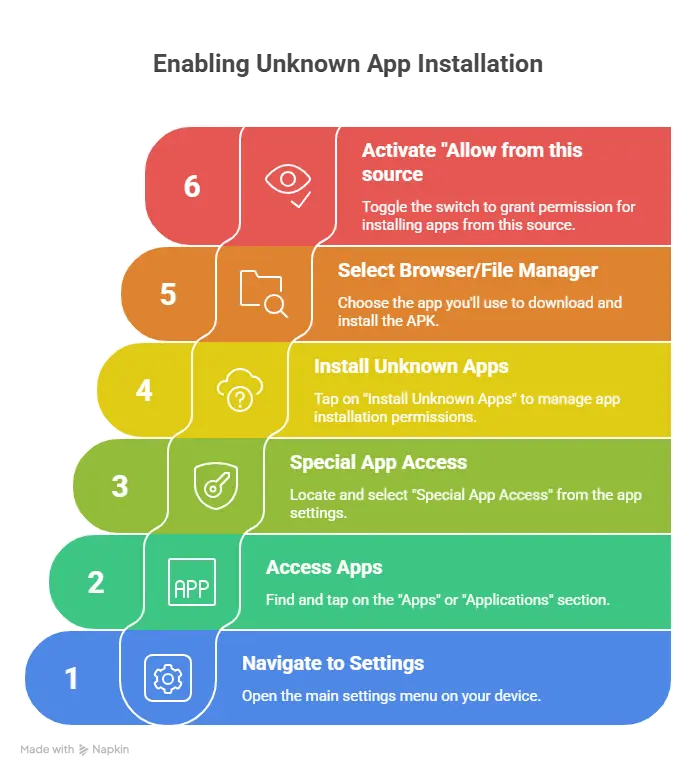
Step 1: Allow App Installation
Go to Settings → Apps → Special App Access → Install Unknown Apps. Find your browser or file manager and turn on “Allow from this source.”
Step 2: Install MicroG First (Don’t Skip This!)
Download Vanced MicroG and install it before touching the Vanced APK. Grant it permission to manage accounts. This is what lets you sign in later.
Step 3: Install YouTube Vanced
Download the Vanced APK (use ARM64 for most modern phones). Install it. The app will show up as “YouTube Vanced” so you can still keep regular YouTube installed if you want.
Step 4: Set It Up
Open Vanced, sign in with your Google account, then dive into Vanced Settings to customize everything—enable ad blocking, pick your theme (black for OLED screens), set video quality, turn on SponsorBlock, and adjust gestures.
Your Questions Answered
Better alternatives:
Vanced proved millions of people want ad-free YouTube with background play. It changed the game. But in 2025, ReVanced is the smarter choice for new users—it’s Vanced’s spirit living on with modern support.
Or just pay for Premium if you watch a lot of YouTube. Creators get paid, you get peace of mind, everyone wins.
Conclusion – Should You Still Use YouTube Vanced in 2026?
YouTube Vanced remains a functional application for users who installed it before discontinuation, offering an ad-free YouTube experience with advanced features that official YouTube reserves for Premium subscribers. However, the discontinued status means no security updates, potential compatibility issues with newer Android versions, and risks associated with downloading from unofficial sources.
The feature legacy of YouTube Vanced significantly influenced the modified app ecosystem, demonstrating user demand for enhanced YouTube functionality. While Vanced itself no longer receives development, its impact continues through successor projects like ReVanced, which offers similar capabilities with active maintenance and community-driven development.
For users considering YouTube Vanced in 2025, weigh the benefits of ad-free viewing and background playback against security concerns and Terms of Service violations. Modern alternatives like ReVanced provide updated solutions with ongoing support, making them potentially safer choices for long-term use. Ultimately, YouTube Premium remains the only fully legal and supported method to access these enhanced features while compensating content creators.